Your people
Timesheets & Commission
Where hours come from
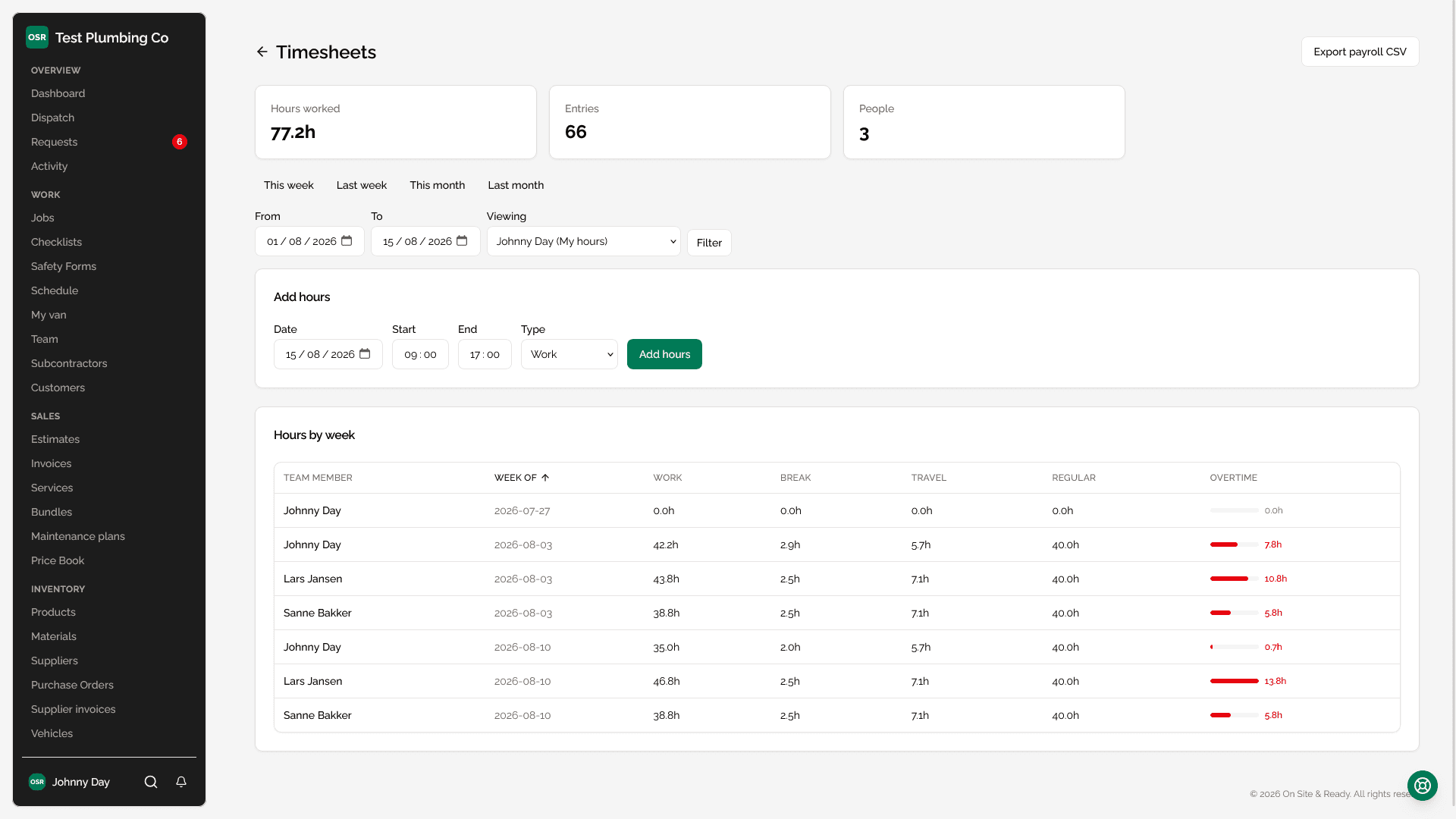
Technicians clock in and out from their own device. Each entry is typed — work, break or travel — because an hour driving and an hour on site are not the same hour when it comes to paying for them or working out utilisation.
Clocking on without pressing anything
Arriving at a job and leaving it are the two moments somebody is least able to press a button — hands full, van door open, phone in a pocket — and they are the two that decide what a day is worth. A forgotten clock-out is not a missing record; it is eleven hours on a timesheet nobody worked.
So a business can switch on automatic clock-on and clock-off. Arriving at a job you are scheduled on starts the shift; leaving ends it, timed from the last position that was still at the property rather than from the moment we noticed — those are the drive away apart, every evening.
| It needs | Because |
|---|---|
| Switching on in Settings | Off by default. This writes to a timesheet without being asked, so it does not arrive switched on in an update nobody read the notes for. |
| Background location on the phone | Arrival is a position, and a browser stops reporting one the moment the screen locks. The technician's own consent applies, and approved leave stops it regardless. |
| Working hours that are set | A shift is never started outside the hours the business has described, so a van passing a property at eleven at night starts nothing. |
Worth knowing
What an hour costs
Hours become money through the pay type on each person's team record — unpaid, an hourly rate, or a salary charged pro-rata across the period. That is what turns the timesheet into the wage bill on the profit and loss. See Expenses, VAT & Profit.
Worth knowing
Reading the timesheet
| Column | What it means |
|---|---|
| Work | Clocked time on jobs. |
| Break | Clocked breaks. Not counted toward regular or overtime. |
| Travel | Time between jobs, clocked separately from work. |
| Regular | Hours up to the weekly threshold. |
| Overtime | Anything past it, drawn as a bar against the worst week on the page so who is being worked too hard is visible rather than calculated. |
Worth knowing
Utilisation
Utilisation is clocked hours against scheduled working hours over the period, using each technician's own weekly working-hours pattern rather than a flat assumption. Somebody who works three days a week is not at 60% utilisation for working three days.
Worth knowing
Commission
A commission rule pays somebody a percentage of a basis — the job's revenue, its profit, or its labour. The commission report totals what each person is owed over a date range, with the basis and percentage shown on every row so the number can be checked rather than trusted.
Worth knowing