Doing the work
Requests & Enquiries
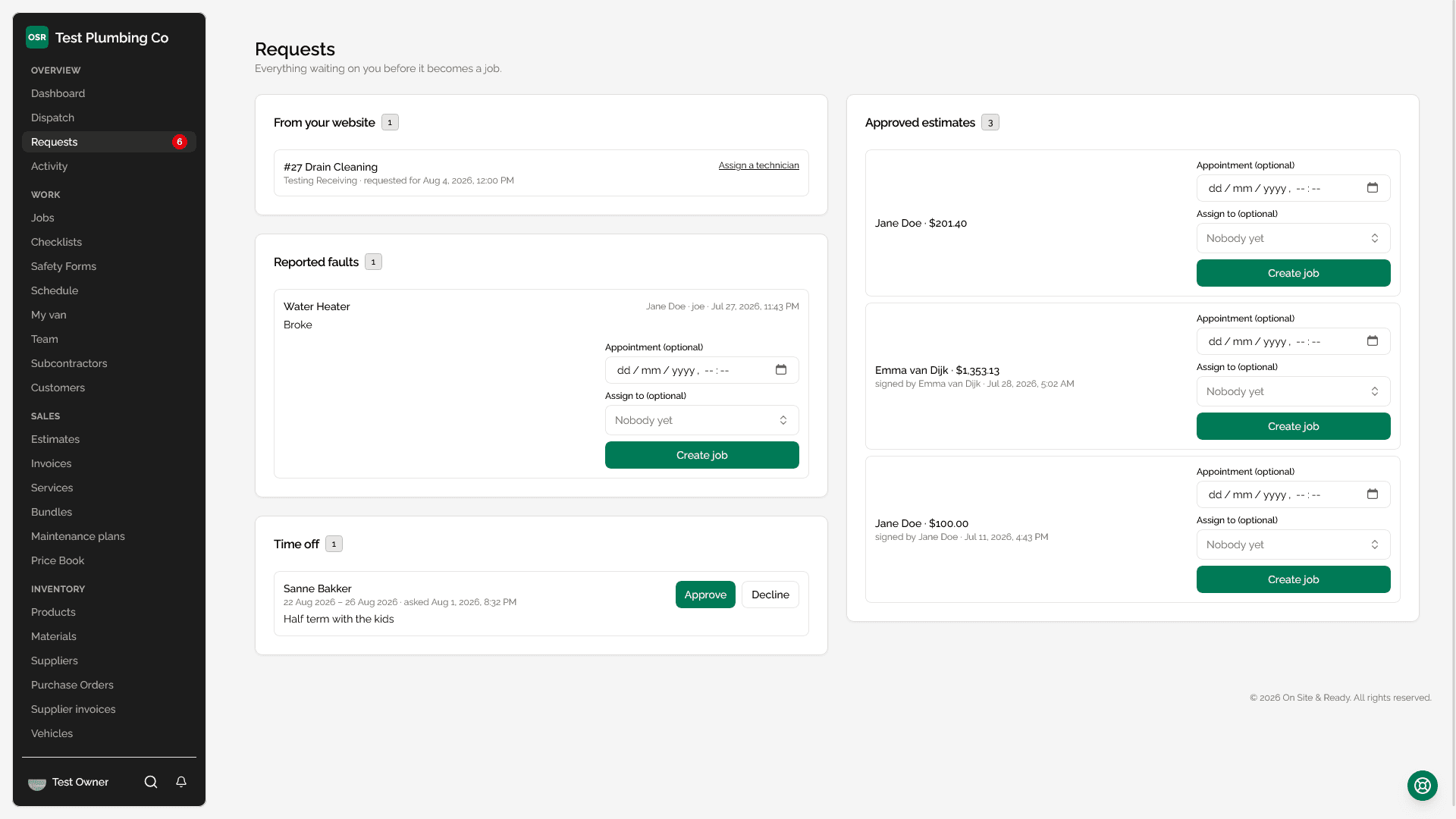
What lands here
| Section | Where it came from | What you do with it |
|---|---|---|
| From your website | Your public booking page, or the 'request a quote' widget on your site | Assign a technician and create the job — or, for a quote request, price it as an estimate |
| Approved estimates | A customer approving and e-signing a quote from their portal | Set an appointment, assign people, create the job |
| Reported faults | A customer scanning the QR sticker on one of their assets | Raise a job against that asset, with or without a time |
| Referred by a customer | Your referral scheme | Same as a booking, with the referrer recorded |
| Time off | A team member asking for days off | Approve or decline, with an optional note they will see |
Booking requests
Every business gets a public booking page that anyone can use without an account. A request carries the requester's name, email, phone, an optional service and a preferred date and time.
The appointment field on the request is optional when you convert it. A business that wants to triage first can raise the job unscheduled, and the customer is only emailed once there is a time to confirm.
What this does not do
Quote requests
The “request a quote” widget on your own site is a different shape from a booking: no date field, and a description is required. It lands in the same inbox marked as a Quote, and the action on it is “Price it” rather than “Assign a technician”.
Same inbox on purpose. Somebody wanting a price and somebody wanting a Tuesday are both work arriving, and splitting them into two screens means one of the two gets checked less often.
Reported faults
A customer who scans the QR sticker on an asset can report a fault without logging in. Those arrive here with the asset attached, so the job you raise is already pointed at the right unit and the right property. See Equipment & Assets.
Time-off requests
Time off sits in the same inbox rather than in a separate approvals screen, because it is the same question: something is waiting on a decision from you. Approving it feeds straight into scheduling — approved time off makes somebody unavailable for assignment, including for automations that pick from a pool.
Worth knowing